 EN
EN RO
RO
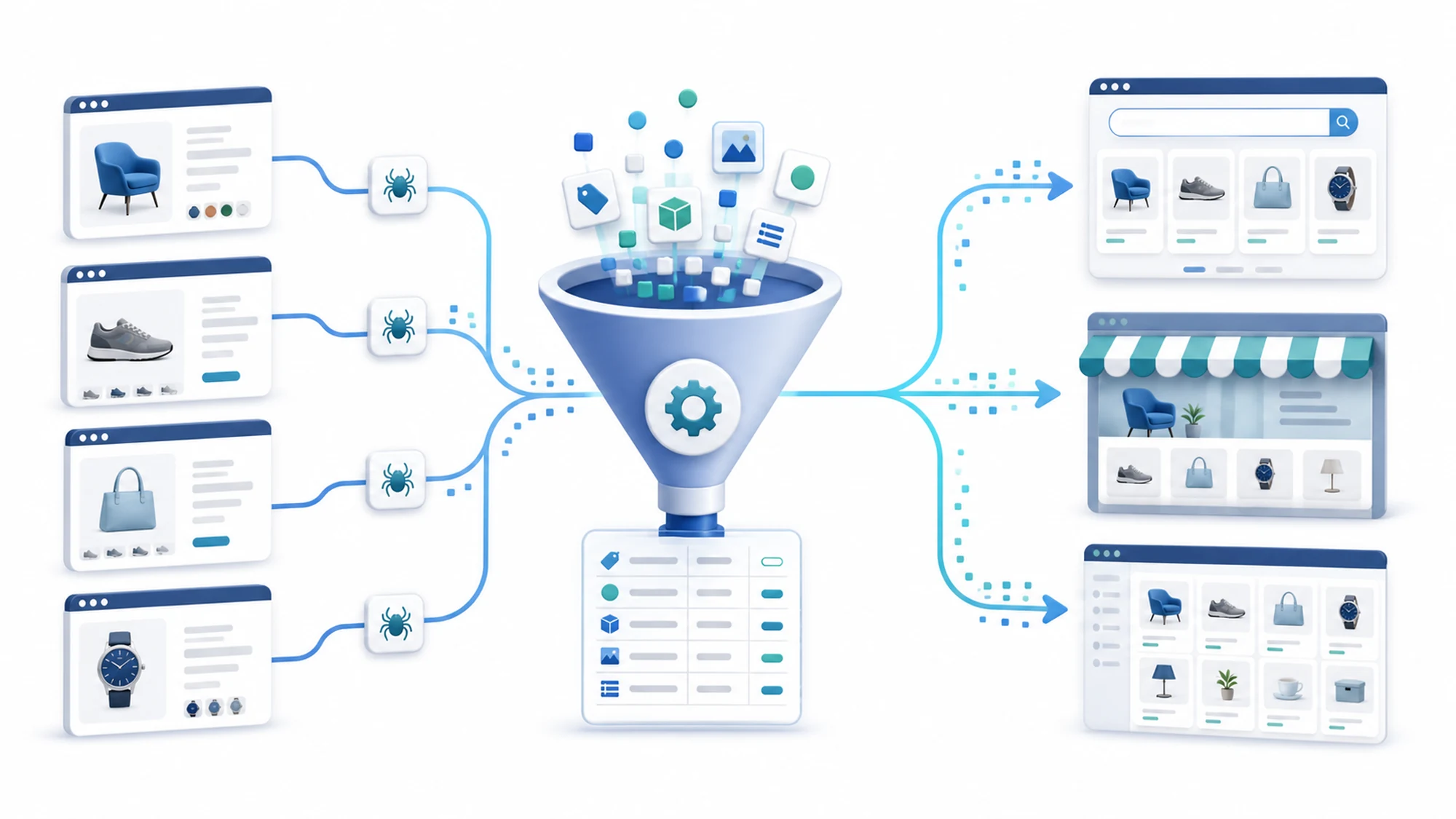
A product feed for Google Shopping or a marketplace is generated automatically by combining two steps: collecting product data wherever it isn't already structured (through web crawling, when the source is a supplier, a manufacturer, or a site with no export of its own) and mapping that data onto the exact list of attributes required by the target channel, followed by a periodic export in the XML or CSV format the platform accepts.
A product feed is, in essence, a structured file that describes every product in your catalog through standardized fields — name, price, availability, image, unique identifier — which Google Shopping or a marketplace reads automatically, without manual intervention, in order to display your products in shopping results or on its own platform.
This guide explains why you need crawling when product data doesn't already come structured from your own store, which attributes a valid feed must contain, what the step-by-step generation process looks like, which format to choose, how often to update it, which common errors get feeds rejected, and how to choose between an in-house solution, a SaaS feed management tool, or a custom crawling service.
Why you need crawling to generate a product feed, not just an export from your store
If all your products are entered manually into your eCommerce platform, with complete price, stock, and description, a native export to Google Shopping or a marketplace may be enough — most platforms (Shopify, WooCommerce, Magento) offer a plugin or module that generates the feed directly from your own database.
The problem appears when a significant part of your product data doesn't exist in a structured form inside your own store: an auto-parts distributor receives catalogs from several suppliers, each in a different format; an electronics retailer pulls technical specifications from manufacturers' websites; an agency builds an aggregated catalog from several public web sources. In these cases, the feed can't be generated directly from your own store, because the source data isn't there — it first has to be extracted through crawling, then normalized, and only after that mapped onto the format required by the channel.
This is the difference from simply populating your own catalog: here, the end goal isn't filling your store, but producing an output file (the feed) that exactly follows the rules imposed by Google Merchant Center or the target marketplace.
Which attributes a valid feed must contain for Google Shopping and marketplaces
Regardless of the channel, a few attributes are almost universally required. The table below summarizes the most important ones, as general guidance, since every marketplace may have additional fields specific to a product category:
| Attribute | Role | Note |
|---|---|---|
| id | Unique product identifier | Must stay constant between updates |
| title, description | Name and description shown to the buyer | No forced keywords or excessive promotional text |
| link, image_link | Product page and main image | Both must be publicly accessible, with no 404 errors |
| price, availability | Current price and stock | Must match the product page exactly |
| brand | Manufacturer/brand | Required for most categories |
| gtin or mpn | Unique product identification code | Required if the product has such a code assigned by the manufacturer |
| condition | Product condition (new, refurbished, used) | Affects eligibility in some categories |
| product_type / category | Product categorization | Must follow the target channel's taxonomy |
The complete, up-to-date attribute specification for Google Shopping is published officially by Google in the Merchant Center documentation (see the Sources section); any additional marketplace has its own list of required attributes, usually available in the seller admin panel.
What the automated feed generation process looks like, step by step
A working pipeline for automatically generating a product feed based on crawling usually follows the same sequence of steps:
- Collection (crawling) — a script periodically visits the target sources (supplier websites, public catalogs) and extracts the raw fields: name, price, product code, images, specifications.
- Cleaning and normalization — raw data is standardized: prices converted to the same format and currency, product names standardized, duplicate codes removed.
- Mapping onto the feed schema — each normalized field is assigned to an attribute required by the channel (for example, the internal field "manufacturer_code" becomes "mpn" in the feed).
- Validation — the feed is automatically checked for missing fields, non-compliant prices, or inaccessible images before submission.
- File generation — the final file is produced in the required format (XML, CSV, or another channel-specific standard).
- Publishing/submission — the feed is uploaded automatically to Google Merchant Center or the marketplace's seller panel, or placed at a URL the platform pulls periodically.
- Monitoring — errors reported by the platform are tracked and fixed at the source, not just in the final file.
Which feed format to choose: XML, CSV, or Google Sheets
Google Merchant Center accepts several formats — XML, CSV, or a Google Sheet linked directly to the account — and most marketplaces accept at least CSV. The choice of format depends less on your own preference and more on the channel's requirements and your catalog size:
- XML is useful for large catalogs with complex data structures (product variants, multiple attributes), and is preferred by many automated integrations.
- CSV is simpler to generate and debug manually, suitable for medium-sized catalogs or initial testing.
- Google Sheets is useful for small catalogs or quick checks, but becomes hard to maintain automatically at large volumes.
When the feed needs to be sent simultaneously to Google Shopping and to one or more marketplaces, the most practical solution is generating an internal "master" feed, from which a separate file is automatically derived for each channel, following that channel's specific format and attributes.
How often should an automated product feed be updated
Update frequency depends on how volatile your products' price and stock are. As a general guideline:
- For products with stable price and stock, a daily update is usually enough.
- For categories with dynamic pricing (electronics, categories with frequent promotions), updating several times a day is worth it.
- For fast-selling products, availability needs to be synced close to real time, otherwise you risk complaints for unfulfilled orders.
A feed generated once and never updated afterward gradually becomes a source of mismatches between the displayed price/stock and the real one — exactly the type of error platforms penalize by rejecting or suspending products.
Common errors that get a feed rejected and how to avoid them
A few errors show up consistently in automatically generated feeds, regardless of channel:
- Missing GTIN or MPN where the manufacturer has assigned one — the fix is extracting this code during the crawling step itself, not filling it in manually later.
- Price mismatch between the feed and the actual product page — usually caused by an update frequency that's too low relative to how often prices change.
- Inaccessible or low-quality images — expired image links or links blocked by the source, which requires automated validation before the feed is submitted.
- Wrong availability status — products marked "in stock" even though they're no longer available at the source, frequently caused by syncing too rarely.
- Wrong category mapping — your internal taxonomy doesn't match the one required by the channel, leading to rejection or incorrect display of the product.
Most of these errors aren't fixed "in the feed" itself, but at the source: either at the crawling step (incomplete extraction) or in the update frequency — which is why automated validation before submission (step 4 in the process above) is essential.
Custom crawling vs. SaaS feed management tools: how to choose
There are two main paths to an automated feed, and the right choice depends on the structure of your data, not on a preference for one tool or another:
- If all your products already exist in a structured form in a single eCommerce platform, a SaaS feed management tool (connected directly to the platform) is usually faster to implement and enough on its own.
- If part of the data first needs to be collected from external sources with no export of their own (suppliers, manufacturers, public catalogs), a custom crawling service is needed before any feed management tool has anything to process.
- If you work with several heterogeneous sources that need to be normalized into a single, consistent catalog before export, combining crawling with custom mapping gives you better control than a generic tool, which usually assumes a single structured data source.
Related crawling articles
- Web crawling vs official API: how to choose the right method
- All HappyWeb articles about crawling
- HappyWeb web crawling service
Frequently asked questions about crawling-based product feeds
What is a product feed for Google Shopping?
It's a structured file (XML, CSV, or Google Sheets) that describes every product in your catalog through standardized attributes — name, price, availability, image, identifier — which Google Merchant Center reads automatically to display your products in Google Shopping.
Can I use crawling if I already have an online store with my own data?
Yes, but usually only partly — if all your products already have complete price, stock, and description in your platform, a native export is enough; crawling becomes necessary where part of the data (specifications, images, manufacturer codes) comes from external sources with no export of their own.
How much does automatically generating a product feed through crawling cost?
The cost depends on the number of data sources, the complexity of normalization, and the required update frequency; the initial setup (the crawling script and the mapping onto the feed schema) usually costs more than ongoing maintenance.
How often does a feed need to be updated to avoid rejection?
There's no universal threshold, but price and availability need to match the actual product page almost all the time; for categories with volatile pricing or stock, a daily update is usually the recommended minimum.
What's the difference between a Google Shopping feed and a marketplace feed?
The basic structure (name, price, availability, image, identifier) is similar, but each marketplace may require additional attributes specific to the product category and its own category taxonomy, different from the one Google uses.
Is it legal to extract data from suppliers through crawling for my own feed?
It depends on the source site's terms and its robots.txt file; always check these conditions before starting collection, and for unclear situations, seek specialized legal advice.
Conclusion: an automated product feed starts with complete data, not just an export
A working product feed for Google Shopping or a marketplace isn't just a file exported once — it's an ongoing process: collecting missing data through crawling where needed, normalizing it, mapping it onto the exact attributes required by the channel, and updating it at a frequency that matches how volatile your price and stock are. The practical starting point is identifying the real source of your data — your own store, external suppliers, or a combination of both — before choosing the tool that will generate the feed.
Want to automate data collection for your store? Contact us for a personalized quote, or see the full web crawling service.
Need a product feed for Google Shopping or a marketplace?
The HappyWeb team collects the missing data through crawling, normalizes it, and delivers the feed automatically, in the format each channel requires. Let's discuss your project.
Sources
Article last updated: 2026-07-05 · Recommended review: within 90-180 days, since Google Merchant Center's and marketplaces' format requirements can change.
- HappyWeb — Online data retrieval (crawling) services, definition, use cases and delivery formats: happyweb.ro/en/services/services-web-crawling.
- Google Merchant Center — official product data specification for feeds: support.google.com/merchants/answer/7052112.
If you have questions about generating a product feed for your project, contact us.
Image generated with AI, used for illustrative purposes.

Write a comment